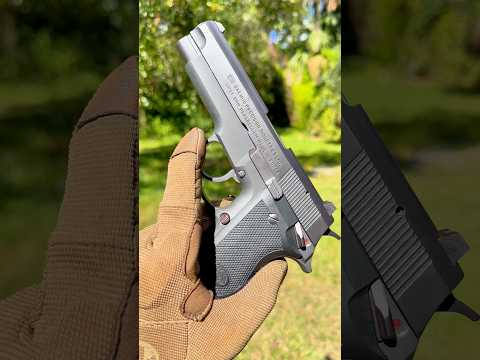
Daewoo DP51 “Fast Action” Triple Action Trigger Demo

Published on July 30, 2023
Duration: 1:01

This guide details the unique operating system of the Daewoo DP51 pistol, as explained by an instructor with high authority. It breaks down the differences between Single Action, Double Action, and the distinctive 'Fast Action' (Triple Action) mode, emphasizing how each affects the trigger pull and hammer position. Safe handling practices are implicitly demonstrated throughout the explanation of these mechanical states.

Quick Summary

The Daewoo DP51 pistol features a unique 'Triple Action' or 'Fast Action' operating system. This system allows the user to manually push the cocked hammer forward, maintaining mainspring tension for a long but very light trigger pull that resets the hammer before firing, differentiating it from standard SA/DA mechanisms.

Chapters

  1. 00:00Introduction to Daewoo DP51
  2. 00:17Single Action (SA) Mode Explained
  3. 00:28Double Action (DA) Mode Explained
  4. 00:43Fast Action (Triple Action) Mode Explained

Frequently Asked Questions

What is the unique feature of the Daewoo DP51 pistol?

The Daewoo DP51 is distinguished by its unique 'Triple Action' or 'Fast Action' operating system, which differs from standard single-action or double-action handguns, offering distinct trigger pull characteristics.

How does the 'Fast Action' mode work on the Daewoo DP51?

In 'Fast Action' mode, the user can manually push the cocked hammer forward. This maintains mainspring tension, resulting in a long but very light trigger pull that resets the hammer to the cocked position before firing.

What are the different trigger modes on the Daewoo DP51?

The Daewoo DP51 features Single Action (SA), Double Action (DA), and its unique 'Fast Action' or 'Triple Action' mode. SA offers a short, crisp pull after the hammer is cocked, DA has a long, heavy pull, and Fast Action provides a light pull after manual hammer manipulation.

More Training & Techniques Videos You Might Like

More from Booligan Shooting Sports

View all →