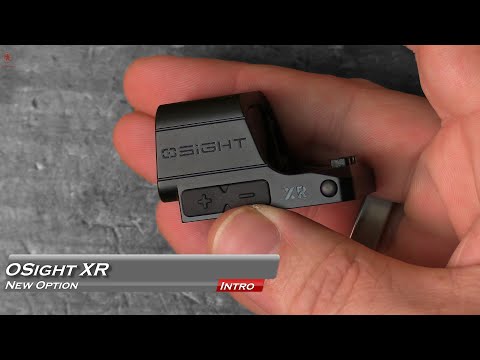
New Optic!!! XR!!!

Published on January 13, 2026
Duration: 0:59

This guide covers the installation and key features of the Osight XR optic, as demonstrated by Shortshot Tony. It highlights the optic's RMR footprint, integrated backup sights, shake-awake functionality, and unique magnetic charging system. The review suggests it's a viable option for concealed carry after durability testing.

Quick Summary

The Osight XR is an enclosed red dot sight featuring an RMR footprint, shake-awake technology, and integrated pop-up backup sights. It uniquely charges magnetically via its dust cover and offers 2 MOA dot, 6 MOA dot, or 32 MOA circle reticle options, making it a durable choice for concealed carry.

Chapters

  1. 00:00Introduction to Osight XR
  2. 00:09Pop-up Backup Sights
  3. 00:21Charging Mechanism
  4. 00:28Reticle and Features
  5. 00:35Durability and Conclusion

Frequently Asked Questions

What are the key features of the Osight XR optic?

The Osight XR is an enclosed red dot sight with an RMR footprint. It boasts shake-awake technology, integrated pop-up backup sights, and a unique magnetic charging system via its dust cover. It also offers multiple reticle options.

How is the Osight XR optic charged?

Unlike traditional optics, the Osight XR does not have a removable battery. It features a magnetic charging dust cover that snaps into place, allowing for convenient recharging of the internal battery.

What reticle options are available for the Osight XR?

The Osight XR provides versatility with multiple reticle choices. Users can select between a 2 MOA dot, a 6 MOA dot, or a 32 MOA circle, catering to different aiming preferences and shooting scenarios.

Is the Osight XR suitable for concealed carry?

According to the reviewer, Shortshot Tony, the Osight XR is considered the first Osight optic he would personally use for concealed carry, following durability testing. This suggests a positive outlook on its robustness for everyday carry.

More Tactical & Gear Videos You Might Like

More from SHORTSHOT TONY

View all →